Microsoft has announced the much-anticipated new calling and meeting experience for Teams. Starting in June, Microsoft will begin to roll out a feature enabling users to view meetings and calls in separate windows. We at WheelHouse IT are ecstatic that this is finally coming to life!
Let’s take a moment to break down what’s going to happen and how it will impact your Teams experience.
When Will This Happen?
Microsoft has announced that beginning in June 2020, the rollout shall begin.
How Will This Teams Change Impact Your Organization?
Once the feature is available, you will have the ability to view meetings and calls in separate windows from the Microsoft Teams client. Another feature added is that the call controls — mute, video, chat, leave, and others — will have a new home at the top of the meetings window. This has been designed to avoid blocking any content being displayed within the Teams meeting. A nice touch, in our opinion.
Additionally, Microsoft has announced that this update will include features such as 3×3 video — or, more simply put, you can have 9 video participants in view at once. The option to “raise your hand” and custom backgrounds will also be included.
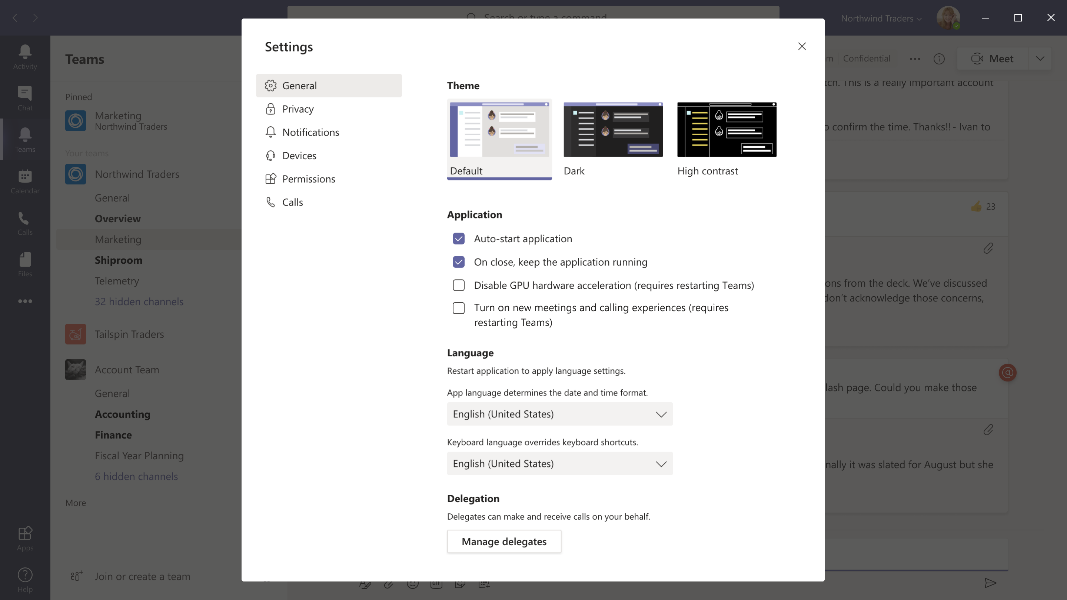
To make the user experience better, Microsoft will roll this update out as OFF by default. Users will need to manually turn on the new experience via the user setting: General > Turn on new meetings and calling experience.
Let’s Take a Look at the Teams Changes
The new 3×3 video experience:
New meetings/calls control location:
Steps to Turn On the Updates
Step 1: Click on your avatar in the top right of Teams and click Settings.
Step 2: Check the Turn on new calling and meetings experiences checkbox, then restart your Teams client.
Microsoft has noted that they expect the new experiences to be enabled along the following timeline:
June — New experiences are available and users can enable through settings
July — Experiences are enabled by default and users can disable through settings
August — Experiences are enabled by default and user controls are no longer available
Limitations
Meeting notes will launch to the main Teams client
Support for full-screen content viewing will be coming in the future
Support for Invision Freehand Whiteboard will be coming in the future