
Drag and drop an email conversation and choose the Teams Meeting option
Easily Share Conversations
Many of today’s business conversations are digital and fluid, with different people entering and leaving as necessary. Sometimes it’s appropriate to share the details of a digital conversation with external business partners. You can share Teams Chat messages with your Outlook email contacts with the Share to Outlook option found behind the ellipses of the Teams message.
Share to Outlook from Teams Chat
Another way to share an email thread with members of a Teams Channel is to simply include the channel as a recipient of your email in Outlook — you can get the channel email address from behind the ellipses next to the channel name in Teams. This way, you can continue your email conversation while keeping the Teams Channel members in the loop. You can also bring someone’s attention to a Teams Chat or email conversation in Outlook by using @mention. This Microsoft 365 connected experience helps you focus on what requires attention and get things done that are assigned to you. For added assurance that you don’t miss a thing, you can set notifications in Teams to receive an email if you don’t get a chance to respond in Teams in a timely way. Maintaining and growing our connections with the people we work with every day is increasingly important. Microsoft will continue to develop additional experiences that connect Outlook and Teams in ways that help you stay organized and connected and simplify your daily life. Want to get the most out of Teams and Outlook for your business? Contact WheelHouse IT today — as a Microsoft partner, we help businesses implement and optimize Microsoft 365 environments every day.By: Eugeine Burrage, Microsoft
Meeting Insights include files that are relevant to your Teams Meeting
When working remotely, you may still need to handle complex scheduling activities from your mobile device as you go about your day. You can now edit a Teams Meeting series from Outlook, as well as accept, view, and propose new times to meet. You can also quickly convert an email conversation into a Teams Meeting by selecting Convert to Event when replying to an email on your phone, or drag the thread from your Outlook message list to My Day or the Calendar module on a larger screen.
Drag and drop an email conversation and choose the Teams Meeting option
Easily Share Conversations
Many of today’s business conversations are digital and fluid, with different people entering and leaving as necessary. Sometimes it’s appropriate to share the details of a digital conversation with external business partners. You can share Teams Chat messages with your Outlook email contacts with the Share to Outlook option found behind the ellipses of the Teams message.Share to Outlook from Teams Chat
Another way to share an email thread with members of a Teams Channel is to simply include the channel as a recipient of your email in Outlook — you can get the channel email address from behind the ellipses next to the channel name in Teams. This way, you can continue your email conversation while keeping the Teams Channel members in the loop. You can also bring someone’s attention to a Teams Chat or email conversation in Outlook by using @mention. This Microsoft 365 connected experience helps you focus on what requires attention and get things done that are assigned to you. For added assurance that you don’t miss a thing, you can set notifications in Teams to receive an email if you don’t get a chance to respond in Teams in a timely way. Maintaining and growing our connections with the people we work with every day is increasingly important. Microsoft will continue to develop additional experiences that connect Outlook and Teams in ways that help you stay organized and connected and simplify your daily life. Want to get the most out of Teams and Outlook for your business? Contact WheelHouse IT today — as a Microsoft partner, we help businesses implement and optimize Microsoft 365 environments every day.By: Eugeine Burrage, Microsoft
Get the Teams mobile app when you RSVP to a Teams Meeting
Following updates to Search in Outlook mobile, a new feed in Outlook for iOS brings forward the files you may need quick access to for your upcoming events and Teams Meetings with This Week For You.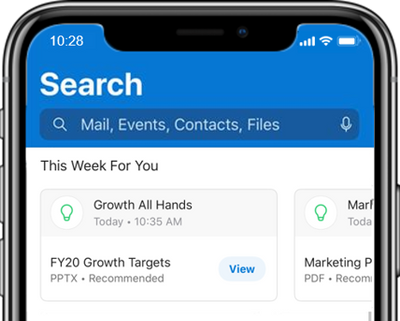
Meeting Insights include files that are relevant to your Teams Meeting
When working remotely, you may still need to handle complex scheduling activities from your mobile device as you go about your day. You can now edit a Teams Meeting series from Outlook, as well as accept, view, and propose new times to meet. You can also quickly convert an email conversation into a Teams Meeting by selecting Convert to Event when replying to an email on your phone, or drag the thread from your Outlook message list to My Day or the Calendar module on a larger screen.Drag and drop an email conversation and choose the Teams Meeting option
Easily Share Conversations
Many of today’s business conversations are digital and fluid, with different people entering and leaving as necessary. Sometimes it’s appropriate to share the details of a digital conversation with external business partners. You can share Teams Chat messages with your Outlook email contacts with the Share to Outlook option found behind the ellipses of the Teams message.Share to Outlook from Teams Chat
Another way to share an email thread with members of a Teams Channel is to simply include the channel as a recipient of your email in Outlook — you can get the channel email address from behind the ellipses next to the channel name in Teams. This way, you can continue your email conversation while keeping the Teams Channel members in the loop. You can also bring someone’s attention to a Teams Chat or email conversation in Outlook by using @mention. This Microsoft 365 connected experience helps you focus on what requires attention and get things done that are assigned to you. For added assurance that you don’t miss a thing, you can set notifications in Teams to receive an email if you don’t get a chance to respond in Teams in a timely way. Maintaining and growing our connections with the people we work with every day is increasingly important. Microsoft will continue to develop additional experiences that connect Outlook and Teams in ways that help you stay organized and connected and simplify your daily life. Want to get the most out of Teams and Outlook for your business? Contact WheelHouse IT today — as a Microsoft partner, we help businesses implement and optimize Microsoft 365 environments every day.By: Eugeine Burrage, Microsoft
Avoid last-minute downloads when you create a Teams Meeting
This way, you can take advantage of the quick one-touch Join from Outlook and be prepared to take a Teams Meeting from your phone — avoiding a last-minute installation that could otherwise result in missing a few minutes of your meeting. Soon, a quick link to download the Teams mobile app will also be added to Outlook email RSVP responses.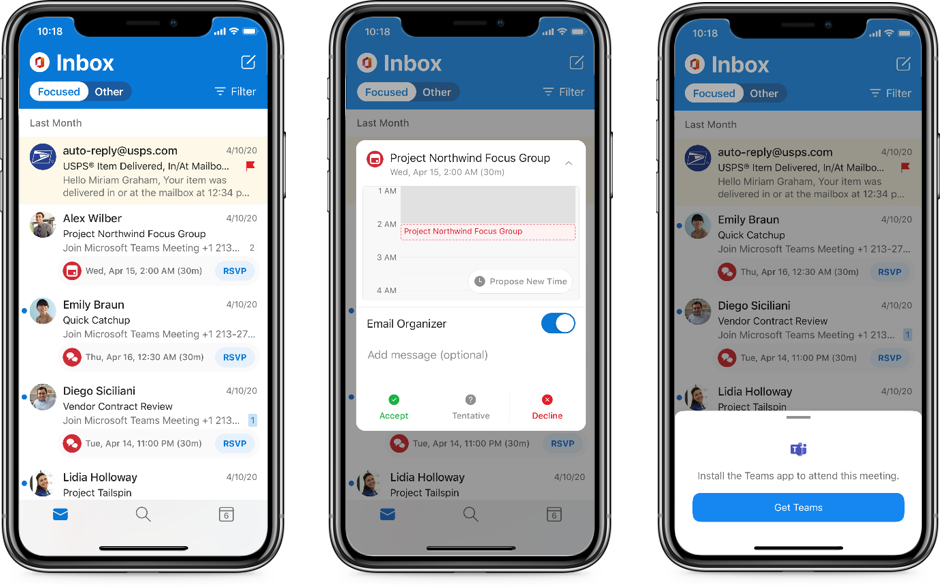
Get the Teams mobile app when you RSVP to a Teams Meeting
Following updates to Search in Outlook mobile, a new feed in Outlook for iOS brings forward the files you may need quick access to for your upcoming events and Teams Meetings with This Week For You.Meeting Insights include files that are relevant to your Teams Meeting
When working remotely, you may still need to handle complex scheduling activities from your mobile device as you go about your day. You can now edit a Teams Meeting series from Outlook, as well as accept, view, and propose new times to meet. You can also quickly convert an email conversation into a Teams Meeting by selecting Convert to Event when replying to an email on your phone, or drag the thread from your Outlook message list to My Day or the Calendar module on a larger screen.Drag and drop an email conversation and choose the Teams Meeting option
Easily Share Conversations
Many of today’s business conversations are digital and fluid, with different people entering and leaving as necessary. Sometimes it’s appropriate to share the details of a digital conversation with external business partners. You can share Teams Chat messages with your Outlook email contacts with the Share to Outlook option found behind the ellipses of the Teams message.Share to Outlook from Teams Chat
Another way to share an email thread with members of a Teams Channel is to simply include the channel as a recipient of your email in Outlook — you can get the channel email address from behind the ellipses next to the channel name in Teams. This way, you can continue your email conversation while keeping the Teams Channel members in the loop. You can also bring someone’s attention to a Teams Chat or email conversation in Outlook by using @mention. This Microsoft 365 connected experience helps you focus on what requires attention and get things done that are assigned to you. For added assurance that you don’t miss a thing, you can set notifications in Teams to receive an email if you don’t get a chance to respond in Teams in a timely way. Maintaining and growing our connections with the people we work with every day is increasingly important. Microsoft will continue to develop additional experiences that connect Outlook and Teams in ways that help you stay organized and connected and simplify your daily life. Want to get the most out of Teams and Outlook for your business? Contact WheelHouse IT today — as a Microsoft partner, we help businesses implement and optimize Microsoft 365 environments every day.By: Eugeine Burrage, Microsoft
Join from Calendar agenda
If you need to step out and attend an online meeting from your mobile phone but haven’t installed the Teams app yet, Outlook will guide you through the experience before it becomes time-critical. When you create a New Event or open a Teams Meeting on your Outlook calendar from your phone without the Teams mobile app installed, you’ll be prompted to add the app to your device.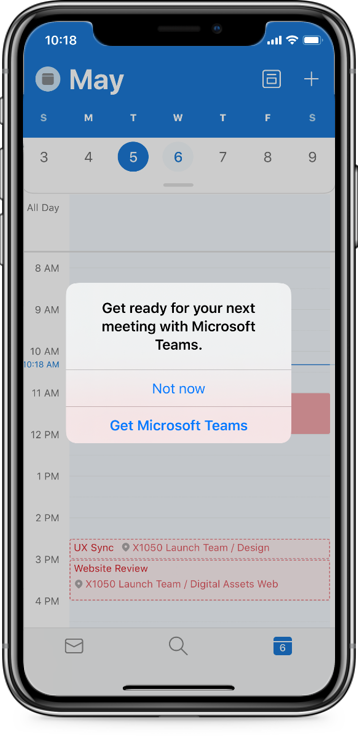
Avoid last-minute downloads when you create a Teams Meeting
This way, you can take advantage of the quick one-touch Join from Outlook and be prepared to take a Teams Meeting from your phone — avoiding a last-minute installation that could otherwise result in missing a few minutes of your meeting. Soon, a quick link to download the Teams mobile app will also be added to Outlook email RSVP responses.Get the Teams mobile app when you RSVP to a Teams Meeting
Following updates to Search in Outlook mobile, a new feed in Outlook for iOS brings forward the files you may need quick access to for your upcoming events and Teams Meetings with This Week For You.Meeting Insights include files that are relevant to your Teams Meeting
When working remotely, you may still need to handle complex scheduling activities from your mobile device as you go about your day. You can now edit a Teams Meeting series from Outlook, as well as accept, view, and propose new times to meet. You can also quickly convert an email conversation into a Teams Meeting by selecting Convert to Event when replying to an email on your phone, or drag the thread from your Outlook message list to My Day or the Calendar module on a larger screen.Drag and drop an email conversation and choose the Teams Meeting option
Easily Share Conversations
Many of today’s business conversations are digital and fluid, with different people entering and leaving as necessary. Sometimes it’s appropriate to share the details of a digital conversation with external business partners. You can share Teams Chat messages with your Outlook email contacts with the Share to Outlook option found behind the ellipses of the Teams message.Share to Outlook from Teams Chat
Another way to share an email thread with members of a Teams Channel is to simply include the channel as a recipient of your email in Outlook — you can get the channel email address from behind the ellipses next to the channel name in Teams. This way, you can continue your email conversation while keeping the Teams Channel members in the loop. You can also bring someone’s attention to a Teams Chat or email conversation in Outlook by using @mention. This Microsoft 365 connected experience helps you focus on what requires attention and get things done that are assigned to you. For added assurance that you don’t miss a thing, you can set notifications in Teams to receive an email if you don’t get a chance to respond in Teams in a timely way. Maintaining and growing our connections with the people we work with every day is increasingly important. Microsoft will continue to develop additional experiences that connect Outlook and Teams in ways that help you stay organized and connected and simplify your daily life. Want to get the most out of Teams and Outlook for your business? Contact WheelHouse IT today — as a Microsoft partner, we help businesses implement and optimize Microsoft 365 environments every day.By: Eugeine Burrage, Microsoft
Join from your Outlook Calendar notifications
Join from Calendar agenda
If you need to step out and attend an online meeting from your mobile phone but haven’t installed the Teams app yet, Outlook will guide you through the experience before it becomes time-critical. When you create a New Event or open a Teams Meeting on your Outlook calendar from your phone without the Teams mobile app installed, you’ll be prompted to add the app to your device.Avoid last-minute downloads when you create a Teams Meeting
This way, you can take advantage of the quick one-touch Join from Outlook and be prepared to take a Teams Meeting from your phone — avoiding a last-minute installation that could otherwise result in missing a few minutes of your meeting. Soon, a quick link to download the Teams mobile app will also be added to Outlook email RSVP responses.Get the Teams mobile app when you RSVP to a Teams Meeting
Following updates to Search in Outlook mobile, a new feed in Outlook for iOS brings forward the files you may need quick access to for your upcoming events and Teams Meetings with This Week For You.Meeting Insights include files that are relevant to your Teams Meeting
When working remotely, you may still need to handle complex scheduling activities from your mobile device as you go about your day. You can now edit a Teams Meeting series from Outlook, as well as accept, view, and propose new times to meet. You can also quickly convert an email conversation into a Teams Meeting by selecting Convert to Event when replying to an email on your phone, or drag the thread from your Outlook message list to My Day or the Calendar module on a larger screen.Drag and drop an email conversation and choose the Teams Meeting option
Easily Share Conversations
Many of today’s business conversations are digital and fluid, with different people entering and leaving as necessary. Sometimes it’s appropriate to share the details of a digital conversation with external business partners. You can share Teams Chat messages with your Outlook email contacts with the Share to Outlook option found behind the ellipses of the Teams message.Share to Outlook from Teams Chat
Another way to share an email thread with members of a Teams Channel is to simply include the channel as a recipient of your email in Outlook — you can get the channel email address from behind the ellipses next to the channel name in Teams. This way, you can continue your email conversation while keeping the Teams Channel members in the loop. You can also bring someone’s attention to a Teams Chat or email conversation in Outlook by using @mention. This Microsoft 365 connected experience helps you focus on what requires attention and get things done that are assigned to you. For added assurance that you don’t miss a thing, you can set notifications in Teams to receive an email if you don’t get a chance to respond in Teams in a timely way. Maintaining and growing our connections with the people we work with every day is increasingly important. Microsoft will continue to develop additional experiences that connect Outlook and Teams in ways that help you stay organized and connected and simplify your daily life. Want to get the most out of Teams and Outlook for your business? Contact WheelHouse IT today — as a Microsoft partner, we help businesses implement and optimize Microsoft 365 environments every day.By: Eugeine Burrage, Microsoft
Join from Up Next in your Outlook Focused Inbox
Join from your Outlook Calendar notifications
Join from Calendar agenda
If you need to step out and attend an online meeting from your mobile phone but haven’t installed the Teams app yet, Outlook will guide you through the experience before it becomes time-critical. When you create a New Event or open a Teams Meeting on your Outlook calendar from your phone without the Teams mobile app installed, you’ll be prompted to add the app to your device.Avoid last-minute downloads when you create a Teams Meeting
This way, you can take advantage of the quick one-touch Join from Outlook and be prepared to take a Teams Meeting from your phone — avoiding a last-minute installation that could otherwise result in missing a few minutes of your meeting. Soon, a quick link to download the Teams mobile app will also be added to Outlook email RSVP responses.Get the Teams mobile app when you RSVP to a Teams Meeting
Following updates to Search in Outlook mobile, a new feed in Outlook for iOS brings forward the files you may need quick access to for your upcoming events and Teams Meetings with This Week For You.Meeting Insights include files that are relevant to your Teams Meeting
When working remotely, you may still need to handle complex scheduling activities from your mobile device as you go about your day. You can now edit a Teams Meeting series from Outlook, as well as accept, view, and propose new times to meet. You can also quickly convert an email conversation into a Teams Meeting by selecting Convert to Event when replying to an email on your phone, or drag the thread from your Outlook message list to My Day or the Calendar module on a larger screen.Drag and drop an email conversation and choose the Teams Meeting option
Easily Share Conversations
Many of today’s business conversations are digital and fluid, with different people entering and leaving as necessary. Sometimes it’s appropriate to share the details of a digital conversation with external business partners. You can share Teams Chat messages with your Outlook email contacts with the Share to Outlook option found behind the ellipses of the Teams message.Share to Outlook from Teams Chat
Another way to share an email thread with members of a Teams Channel is to simply include the channel as a recipient of your email in Outlook — you can get the channel email address from behind the ellipses next to the channel name in Teams. This way, you can continue your email conversation while keeping the Teams Channel members in the loop. You can also bring someone’s attention to a Teams Chat or email conversation in Outlook by using @mention. This Microsoft 365 connected experience helps you focus on what requires attention and get things done that are assigned to you. For added assurance that you don’t miss a thing, you can set notifications in Teams to receive an email if you don’t get a chance to respond in Teams in a timely way. Maintaining and growing our connections with the people we work with every day is increasingly important. Microsoft will continue to develop additional experiences that connect Outlook and Teams in ways that help you stay organized and connected and simplify your daily life. Want to get the most out of Teams and Outlook for your business? Contact WheelHouse IT today — as a Microsoft partner, we help businesses implement and optimize Microsoft 365 environments every day.By: Eugeine Burrage, Microsoft
The global workforce is adapting to the new world of working from home, working from anywhere, and experiencing the new normal of staying connected almost exclusively through digital experiences. At Microsoft, there’s a commitment to building experiences that help you stay productive — connecting solutions in a way that saves time and effort. Between Microsoft Teams as your hub for teamwork and Outlook as your personal organizer for direct communications and time management, it’s essential to continue creating connected experiences that simplify how you stay organized and get things done. Responding to customers’ need for help with working and doing business remotely, here are tips and insights about how Teams and Outlook work together — first, highlighting current capabilities that help you plan, schedule, and show up on time to online meetings, and then sharing ways to connect your conversations between threaded email messages and Teams Chat.Join Online Meetings on Time and Show Up Prepared
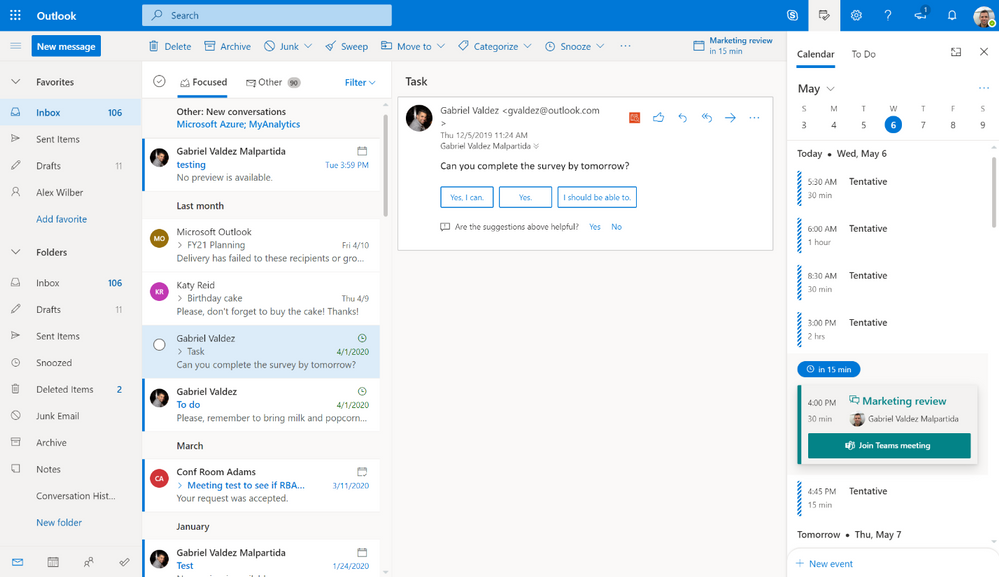
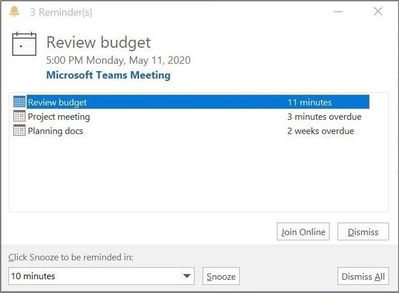
Outlook already makes it simple to create a new meeting and add join-in details with a single click or toggle to turn on Teams Meetings. There are also helpful tips in Outlook for managing your time when working remotely — including the option to shorten the standard duration for your meetings. Taking this one step further, you can make all meetings online meetings by default. Since most — if not all — meetings today take place over video conference calls, you can continue to simply create meetings without having to remember to turn on Teams Meetings. Notifications serve as reminders of when it’s time to join your meetings, which is especially helpful if you’re distracted by family or personal matters when working from home. The quick join button has been added where and when you need it, providing a fast and easy way to connect to Teams Meetings so you can show up on time: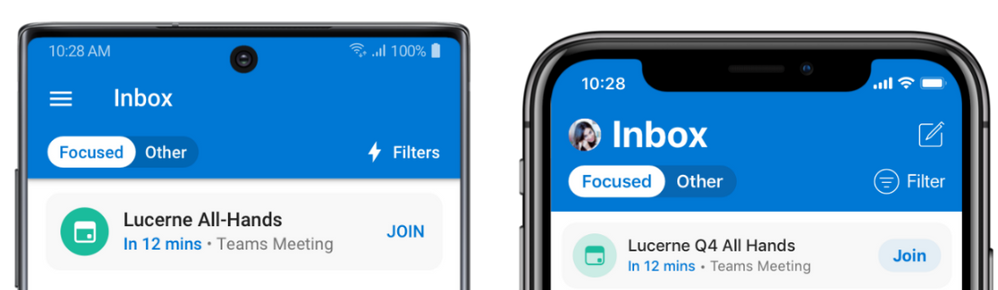
Join from Up Next in your Outlook Focused Inbox
Join from your Outlook Calendar notifications
Join from Calendar agenda
If you need to step out and attend an online meeting from your mobile phone but haven’t installed the Teams app yet, Outlook will guide you through the experience before it becomes time-critical. When you create a New Event or open a Teams Meeting on your Outlook calendar from your phone without the Teams mobile app installed, you’ll be prompted to add the app to your device.Avoid last-minute downloads when you create a Teams Meeting
This way, you can take advantage of the quick one-touch Join from Outlook and be prepared to take a Teams Meeting from your phone — avoiding a last-minute installation that could otherwise result in missing a few minutes of your meeting. Soon, a quick link to download the Teams mobile app will also be added to Outlook email RSVP responses.Get the Teams mobile app when you RSVP to a Teams Meeting
Following updates to Search in Outlook mobile, a new feed in Outlook for iOS brings forward the files you may need quick access to for your upcoming events and Teams Meetings with This Week For You.Meeting Insights include files that are relevant to your Teams Meeting
When working remotely, you may still need to handle complex scheduling activities from your mobile device as you go about your day. You can now edit a Teams Meeting series from Outlook, as well as accept, view, and propose new times to meet. You can also quickly convert an email conversation into a Teams Meeting by selecting Convert to Event when replying to an email on your phone, or drag the thread from your Outlook message list to My Day or the Calendar module on a larger screen.Drag and drop an email conversation and choose the Teams Meeting option
Easily Share Conversations
Many of today’s business conversations are digital and fluid, with different people entering and leaving as necessary. Sometimes it’s appropriate to share the details of a digital conversation with external business partners. You can share Teams Chat messages with your Outlook email contacts with the Share to Outlook option found behind the ellipses of the Teams message.Share to Outlook from Teams Chat
Another way to share an email thread with members of a Teams Channel is to simply include the channel as a recipient of your email in Outlook — you can get the channel email address from behind the ellipses next to the channel name in Teams. This way, you can continue your email conversation while keeping the Teams Channel members in the loop. You can also bring someone’s attention to a Teams Chat or email conversation in Outlook by using @mention. This Microsoft 365 connected experience helps you focus on what requires attention and get things done that are assigned to you. For added assurance that you don’t miss a thing, you can set notifications in Teams to receive an email if you don’t get a chance to respond in Teams in a timely way. Maintaining and growing our connections with the people we work with every day is increasingly important. Microsoft will continue to develop additional experiences that connect Outlook and Teams in ways that help you stay organized and connected and simplify your daily life. Want to get the most out of Teams and Outlook for your business? Contact WheelHouse IT today — as a Microsoft partner, we help businesses implement and optimize Microsoft 365 environments every day.