

Organizations across the globe have turned to Microsoft Teams to communicate better through meetings, calls, and chat. We are taking the time to share our best practices and highlight communication features within this robust app that can transform how your business operates daily.
Meetings have always been the foundation of teamwork. They are proven to be so vital that it’s estimated 37 percent of employee time is spent in meetings. This is a lot of time! So the question we ask is: are you getting the most out of every meeting?
Often, people join a call unprepared because, let’s face it, it takes too much time to find and review materials. During the meeting, there is often a struggle to stay on track when there is no track. This is especially true for remote participants who need to remain fully engaged and feel included. Afterwards, it’s proven that the value of these calls further diminishes when important insights like action items and decisions fall through the cracks from one meeting to the next.
If you are going to get the most from them, you need to change the way you think about a meeting. Today, a meeting is typically treated as a stand-alone event, and the phone and video conferencing tools many people use are designed to support only that event.
Microsoft has performed extensive research that shows us two things: first, meetings are hardly discrete events, but a series of collaborative connections; second, great meetings are not only about what happens during the meeting but also what actions occur before and after.
Microsoft Teams was designed around these findings. Since Microsoft Teams is the hub for teamwork built into Microsoft 365, your Teams meetings are held where your chats and files already live, naturally bringing all of your data into your meetings.
Let’s break this down
During a meeting
Once the meeting begins, people can use a variety of features that help focus attention, drive engagement, and foster inclusion. This includes high-quality audio and video, live captions, real-time co-authoring with Microsoft 365 apps, digital whiteboard, and distraction-free backgrounds. Teams also makes it easy to bring people in from outside of your organization, even if they don’t already have Microsoft 365 licensing. They can use the Teams app or a web browser.
After the meeting
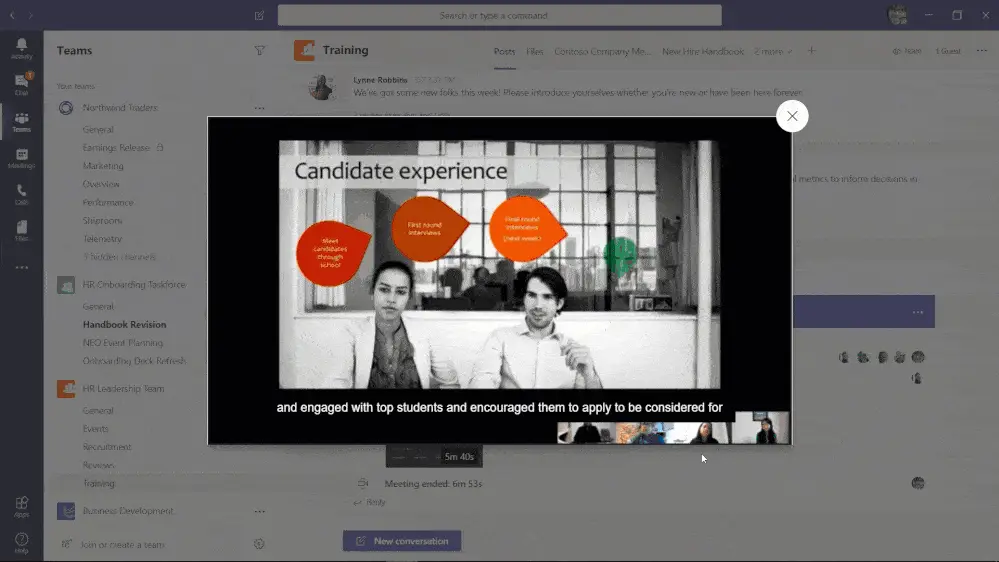
All related assets discussed, including a recording of the meeting, chat, notes, digital whiteboard, transcript, and shared files, are saved in a persistent conversation that helps your team continue the discussion and drive progress forward. Nothing should fall through the cracks anymore.
Teams makes it easy to revisit a meeting recording by allowing people to search for keywords and quickly jump to the point in the recording where a specific topic was discussed. You will never miss the meeting, even if you can’t be there!
Get More Out of Every Meeting
WheelHouse IT helps businesses across South Florida, New York, and Los Angeles configure and maximize their Microsoft 365 environments so every meeting counts. Visit wheelhouseit.com to connect with a WheelHouse IT specialist today.