When it comes to working from home, accessibility is crucial to ensuring ongoing productivity and connectivity. If you and your employees do not have access to the same programs and applications, issues arise when it’s time to collaborate.
As you and your employees continue to work remotely, you need to find a way to stay on the same page, while also providing yourself with a way to manage users and ensure data security. With Azure Virtual Desktop (formerly Windows Virtual Desktop), a part of Microsoft’s Modern Office suite, you can do all of that and more.
In this guide, our experts are going to break down what Azure Virtual Desktop is, detail its defining features, and explain how it benefits your business in this new, digital workspace.
What Features Does Azure Virtual Desktop Have?
Azure Virtual Desktop is a desktop and app virtualization service that runs using the cloud. It allows you to access your Windows desktop and apps through Microsoft Azure, as well as getting built-in security and compliance features. WheelHouse IT’s dedicated Azure Virtual Desktop team helps businesses deploy and manage this environment from day one.
Let’s take a look at a few other key Azure Virtual Desktop features that can help you provide simple remote management while working from home.
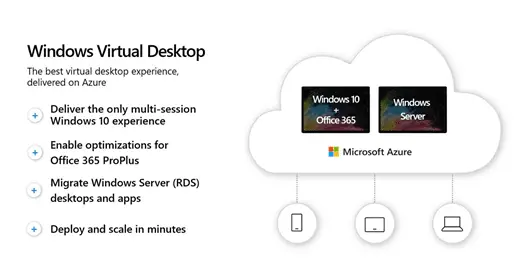
Multi-Session Windows Virtual Desktop Capabilities
Azure Virtual Desktop provides your employees with the ability to have multiple virtual sessions using the cloud. These sessions are totally scalable, feature the latest software updates, and can be accessed on any device—whether that’s a laptop, tablet, or smartphone.
Migrate Windows Server Remote Desktops and Apps to Azure
Azure Virtual Desktop also migrates your remote desktop services (RDS) environment to Azure, complete with a simple management and deployment experience. This eliminates the overhead of maintaining on-premises infrastructure while keeping your apps and data fully accessible. Learn how WheelHouse IT handles end-to-end managed IT migrations for businesses of all sizes.
Ability to Deploy and Scale in Minutes
Azure Virtual Desktop deploys quickly in minutes. With the Azure portal, you can use modern and legacy apps as soon as the desktop virtualizes and scales—no lengthy procurement or hardware setup required.
Flexible Migration to the Cloud for Remote Desktop Services
This platform optimizes your cloud experience while lowering your Windows Server desktop and app costs. With Azure Virtual Desktop, you get all the tools necessary to migrate your business’s apps, data, and infrastructure without having to worry about high costs. For businesses concerned about protecting that data throughout the transition, WheelHouse IT’s security and compliance services ensure nothing falls through the cracks.
Supported Transition to the Latest Windows Environment
Even if you and your employees are not currently using the latest Windows apps, your existing apps will still be compatible with Azure Virtual Desktop. With Microsoft FastTrack and App Assure, you can determine which applications will and will not function. This feature ensures that you can continue to use the apps you are comfortable with while using the Virtual Desktop.

Azure Virtual Desktop for Dev/Test Environments
If you work with coding or other related fields, having the capability to run development and testing scenarios is vital. With Azure Virtual Desktop, you can enable these scenarios, including virtual developer desktops, simplified load and scale testing, and virtual machine (VM) management.
Advanced Security and Productivity with Microsoft 365
You can also use Azure Virtual Desktop in conjunction with Microsoft 365 to get full access to Microsoft 365 Apps, Windows multi-session, Enterprise Mobility and Security, and more. These programs make up the Modern Office suite, which can increase productivity for you and your employees while maintaining a high level of security. For businesses in regulated industries, this combination also supports HIPAA and other compliance requirements right out of the gate.
How Will Azure Virtual Desktop Benefit Your Business?
Remote management for business leaders is an ongoing concern as companies continue to work from home. With Azure Virtual Desktop, both you and your employees can use the same desktop and applications, helping to establish a degree of connectivity. This connectivity will lead to an increase in productivity among team members.
Virtual Desktop is also invaluable for giving everyone in your business access to their data and apps no matter where they are or what device they’re using. Whether they are using a desktop, tablet, or laptop, they will have their entire Windows desktop at their fingertips. WheelHouse IT’s proprietary monitoring platform gives you real-time visibility into that environment around the clock, so your team is never working blind.
How Can WheelHouse IT Help Set Your Business Up for Remote Working Success?
Here at WheelHouse IT, we want to ensure your business sees continued success in these uncertain times (and beyond). We have a dedicated and experienced team of managed IT professionals who can help you navigate this new way of working and assist you in implementing Microsoft Modern Office and Azure Virtual Desktop for your business.
As a certified Microsoft partner with 500+ completed migrations and SOC 2 Type I certification, WheelHouse IT brings the expertise and accountability your business needs to move to the cloud with confidence. Explore our full Modern Workplace services to see how we support every layer of your remote work environment.
Work with a team that is knowledgeable and has experience with Modern Office by getting in touch with us today. Azure Virtual Desktop has the features needed to effectively connect, manage, and secure your business and its employees as you continue to work remotely—and WheelHouse IT has the experts to help you implement the platform effectively.
Let’s work together to make sure your business remains as effective, productive, and secure as possible.
{{cta(‘d1138ca9-0c34-42f7-8f9d-07ac6880f78f’)}}